
In this article, I am going to talk about Best AI Tools Gamers Should Use To Start Twitch Streaming & How Artificial Intelligence Is Changing Live Streaming in 2026.
- Key Point & Best AI Tools Gamers Need to Start Twitch Streaming
- 1. Canva AI for Streamers
- Canva AI for Streamers – Capabilities
- Canva AI for Streamers
- 2. OBS Studio + AI Plugins
- OBS Studio + AI Plugins Capabilities
- OBS Studio + AI Plugins
- 3. Streamlabs AI Assistant
- Streamlabs AI Assistant — Capabilities
- Streamlabs AI Assistant
- 4. Restream AI
- Restream AI — Capabilities
- Restream AI
- 5. Voicemod AI
- Voicemod AI — Capabilities
- Voicemod AI
- 6. Elgato Stream Deck AI
- Elgato Stream Deck AI — Capabilities
- Elgato Stream Deck AI
- 7. DeepBrain AI Avatars
- DeepBrain AI Avatars — Capabilities:
- DeepBrain AI Avatars
- 8. Descript AI
- Descript AI — Capabilities
- Descript AI
- 9. Runway Gen‑3
- Runway Gen-3 — Capabilities
- Runway Gen-3
- 10. Nightbot AI
- Nightbot AI — Capabilities
- Nightbot AI
- Conclusion
- FAQ
This applies to automated overlays, chat moderation tool, AI editor and streaming optimization tools that will enable the gamer to easily start professional streams faster while improving viewership without investing in expensive equipment or advanced tech-savvy.
Key Point & Best AI Tools Gamers Need to Start Twitch Streaming
| AI Tool | Key Points for Streamers |
|---|---|
| Canva AI for Streamers | AI helps create stream overlays, thumbnails, banners, alerts, and social media graphics quickly without design skills. Perfect for branding Twitch channels. |
| OBS Studio + AI Plugins | Free streaming software enhanced with AI noise suppression, auto scene switching, background removal, and smart camera tracking for professional streams. |
| Streamlabs AI Assistant | AI automates alerts, chatbot moderation, stream analytics, and setup guidance, making streaming easier for beginners and solo creators. |
| Restream AI | AI-powered multistreaming tool that broadcasts to Twitch, YouTube, and Facebook simultaneously while generating titles, captions, and chat summaries. |
| Voicemod AI | Real-time AI voice changer adding sound effects, character voices, and immersive audio experiences to entertain viewers during streams. |
| Elgato Stream Deck AI | Smart automation tool that uses AI macros to control scenes, lighting, audio, and apps instantly with customizable buttons. |
| DeepBrain AI Avatars | Creates AI virtual avatars that can host streams, narrate content, or act as VTubers without needing a camera setup. |
| Descript AI | AI editing platform that edits videos and podcasts like text documents, removes filler words, enhances audio, and auto-generates subtitles. |
| Runway Gen-3 | Advanced AI video generation tool used for creating stream intros, cinematic visuals, backgrounds, and creative content instantly. |
| Nightbot AI | AI chatbot that moderates chat, filters spam, runs commands, automates giveaways, and keeps Twitch chat active 24/7. |
1. Canva AI for Streamers
Canva AI Review One of The Simplest Design Platform for Newbie and Professional Streamers who need Our Attractive Twitch Channels. This one lets gamer make overlays, Twitch panels, banners, alerts thumbnails and social media posts using AI templates that suggest layouts. Users with no graphic design knowledge can create professional-level branding in minutes.
AI Magic Design generates all streaming assets on the spot. If we relate our discussion on the Best AI Tools that Gamers Need to Start Twitch Streaming, Canva AI is one of them because a consistent visual identity across platforms makes it easier for viewers and fans in YouTube or Discord communities to recognize you easily right away.
Canva AI for Streamers – Capabilities
- Creating Twitch overlays, banners and thumbnails with AI
- Review of Magic Design tool for auto features generation and on-brand designs.
- Drag-and-drop editor with gaming templates
- Image Background Remover and AI Photo Enhancer
- Resize social media content in a click for all networks at once
Canva AI for Streamers
| Pros | Cons |
|---|---|
| Easy AI overlay and thumbnail creation | Limited advanced animation control |
| Beginner-friendly interface | Requires internet connection |
| AI Magic Design saves time | Some premium assets paid |
| Huge template library | Not built specifically for live streaming |
| Fast branding setup | Export customization limits |
2. OBS Studio + AI Plugins
OBS Studio This is the world included most powerful free broadcasting software application for streamers. But with AI plugins, it gets even smarter in the form of real-time noise suppression, automatic scene detection control audio & video inputs from different sources trigger background remover smart eye-tracking camera framing and more for fast bitrate optimization.
AI enhancements help you only upgrade where necessary without replacing your PA system. Automate filmmaker transitions & minimize manual fine-tuning when on grow your live broadcast. OBS Studio + Ai Plugins — One of the Best AI Tools Gamers Need to Twitch StreamingIt is a must because it allows professional production control while being completely and fully customizable, friendly performance wise for beginners & advanced creators.
OBS Studio + AI Plugins Capabilities
- AI noise cancellation so you can hear microphone clearly of
- Smart transitions and automatic scene switching
- Background Removal Without Green Screen AI
- Stream with smart bitrate optimization
- Advanced customization for recording and going live
OBS Studio + AI Plugins
| Pros | Cons |
|---|---|
| Completely free and open source | Learning curve for beginners |
| AI noise suppression improves audio | Manual setup required |
| Advanced scene customization | Plugin compatibility issues |
| High performance streaming | Requires powerful PC |
| Massive community support | No official built-in AI assistant |
3. Streamlabs AI Assistant
Streamlabs AI Assistant is an automated tool that takes the pressure off those little things you have no experience doing yet, so you can focus on your streaming. The AI assists with stream settings configuration, alert generation, chat moderation, performance data analysis and recommendations for growing engagements and streams. It now includes smart alerts, donation logs, and overlays by default.
Streamers should not have to worry about anything outside of gameplay—AI can handle the heavy-lifting on backend operations. The Streamlabs AI Assistant is on this list of the Best AI Tools Gamers Need to Start Twitch Streaming because it makes beginner broadcast setup and growth easier by bundling broadcasting, analytics, monetization tools and automation all into one easy-to-use dashboard that gets you going faster.
Streamlabs AI Assistant — Capabilities
- AI-guided stream setup and configuration
- Alerts, programmatic donations and overlays
- Intelligent chatbot moderation system
- Flow through performance analysis and growth recommendations
- Integrated monetization tools for creators
Streamlabs AI Assistant
| Pros | Cons |
|---|---|
| Automated stream setup | Some AI tools behind subscription |
| AI chat moderation | Can use extra system resources |
| Built-in alerts and overlays | Less customizable than OBS |
| Easy donation integration | Occasional software bugs |
| Perfect for beginners | Heavy application size |
4. Restream AI
Restream AI Motive enables gamers to go live at the same time on Twitch, YouTube, Facebook and Kick. Capitalizing on AI features, it churns out titles for your stream, captions from what was said during the streams to create highlights automatically along with chat summarization (feeds of chats happening in different platforms at one place). This extends audience reach massively without any additional effort.
Not only does the platform feature analytics insights, but it also tracks audience behavior. That explains why when you consider the Best AI Tools Gamers Need to Start Twitch Streaming, Restream AI becomes a key factor because multistreaming helps new creators discover where audiences grow most rapidly, so it is essential for getting maximum exposure and allows saving an enormous amount of time streaming live content.
Restream AI — Capabilities
- Stream to Twitch, YouTube, Facebook and more!
- AI-generated stream titles and descriptions
- Unified chat management across platforms
- Real-time audience analytics dashboard
- Automatic highlight and caption generation
Restream AI
| Pros | Cons |
|---|---|
| Multi-platform streaming at once | Free version limitations |
| AI chat aggregation | Requires strong internet |
| Audience growth across platforms | Latency may increase |
| Cloud-based streaming | Advanced features paid |
| Easy setup process | Limited deep customization |
5. Voicemod AI
Voicemod AI increases the entertainment value of streams by instantly changing a streamer voice in real time using cutting-edge Andrius AI Voice modeling technology. Streamers can toggle voices of characters, play meme sound effects and make it seem like they are in character for additional role playing immersion.
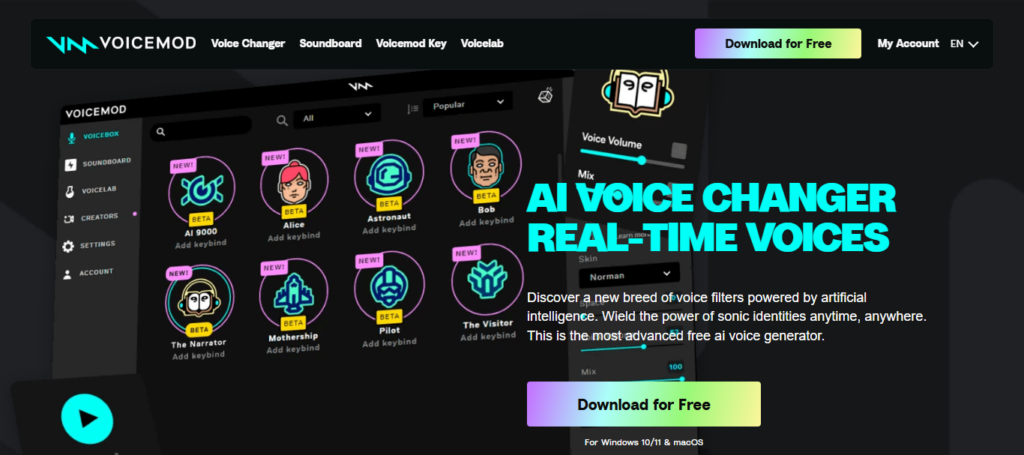
This makes it fit for comedy, storytelling and gaming reactions; being a natural integration into the streaming software and games. Through the list of Best AI Tools Gamers Need to Start Twitch Streaming, Voicemod AI is a special one because popularity on Twitch relies heavily on personality and entertainment values — being memorable with unique voice effects can instantly elevate how good streamers stand out.
Voicemod AI — Capabilities
- Introducing AI Voice Changer for Live Streaming
- Huge library of character voices and sound effects
- Create a custom voice using AI technology
- Though, since you are integrated with streaming software and the games themselves
- Soundboard automation for entertainment moments
Voicemod AI
| Pros | Cons |
|---|---|
| Real-time AI voice changer | Paid premium voices |
| Fun engagement for viewers | Can increase CPU usage |
| Soundboard effects | Not ideal for serious streams |
| Easy integration with streaming apps | Voice delay possible |
| Regular voice updates | Requires setup tuning |
6. Elgato Stream Deck AI
The Elgato Stream Deck AI merges hardware control and intelligent automation so that streamers can run complex tasks with one button press. AI macros can automatically change scenes, activate sound effects or lighting moods, launch applications or apply crazy chat commands. Which alleviates live stream multitasking stress.
Profiles can be for specific games or streaming setups and change near-instantly. Stream Deck AI is a gold standard solution & tool for Twitch streamers because professional streams need quick reflexes, seamless transitions; automation allows creators to produce high-quality production-level streams without needing assistance or technical know-how.
Elgato Stream Deck AI — Capabilities
- Scenes and Streaming Action Control – One Touch
- Macros for Automating Repetitive Tasks with AI
- Open one of the following playlists to get started: App — customizable buttons for apps Audio and lighting
- Multi-profile switching for different games
- Optimizing your workflow for live streams intelligently
Elgato Stream Deck AI
| Pros | Cons |
|---|---|
| One-tap stream automation | Hardware cost required |
| AI workflow automation | Needs initial configuration |
| Scene switching made easy | Requires USB space |
| Professional streaming control | Best with Elgato ecosystem |
| Highly customizable buttons | Learning shortcuts takes time |
7. DeepBrain AI Avatars
DeepBrain AI Avatars provides audiences with a series of virtual presenters and makes it possible to VTuber-style streams without requiring any physical camera setup. AI generates smart digital avatars that can then automatically talk, respond, and present content. This is particularly useful for creators that want the privacy, or their own custom branding styles.
With A.I generated personalities, streamers can then create a voice over for narration / tutorial or interactive streams. DeepBrain AI Avatars ✔ — Great innovation for best Twitch and Youtube tool that opens up those entry barriers by letting low-tech or camera-shy gamers rapidly establish engaging channels complete with a sophisticated virtual persona.
DeepBrain AI Avatars — Capabilities:
- AI-generated virtual streaming avatars
- Camera-free streaming option for privacy
- Automated narration and presentation tools
- VTuber-style content creation support
DeepBrain AI Avatars
| Pros | Cons |
|---|---|
| Stream without showing face | Subscription pricing |
| AI virtual presenters | Limited avatar emotions |
| Great for VTubers | Requires setup time |
| Text-to-speech automation | Not fully natural movements |
| Unique streaming identity | Internet dependent |
8. Descript AI
Descript AI is an advanced editing platform that converts both video and audio-editing into a text-based workflow. Add to that streamers need only edit their transcripts for a quick editing process, no longer have painstakingly generate text-based captioning due the instant automatic transcription removal of filler words and impromptu do-overs followed by remarkable enhancements in sound quality.
The AI Overdub recognizes audio mistakes and can be used to synthesis voice narration correction without re-recording the audio. Featured as one of the Best AI Tools Gamers Need to Start Twitch Streaming, Descript AI allows creators to efficiently repurpose streams into highlights, YouTube videos and social media clips while saving hours in editing time without compromising professional production standards across platforms.
Descript AI — Capabilities
- Text-based system for editing video and audio
- Filler-word removal and audio cleanup with AI
- Automatic subtitle and caption generation
- Overdub: AI Voice Cloning to Edit Narration
- Quickly repurposed for a social media clip
Descript AI
| Pros | Cons |
|---|---|
| AI video editing via text | Advanced features paid |
| Removes filler words automatically | Processing time for large files |
| AI voice cloning | Requires learning workflow |
| Podcast & stream editing combined | Cloud reliance |
| Easy subtitle creation | Not real-time streaming software |
9. Runway Gen‑3
Runway Gen-3 is the next generation of AI video creation for streamers to generate cinematic visuals, animated backgrounds and transitions with prompts. Creators can generate quality visuals at the snap of their fingers (without needing expensive editors or designers). Other benefits include AI-infused motion tracking and video enhancement tools that help embellish the aesthetics of content.
In the Best AI Tools Gamers Need to Start Twitch Streaming article, Runway Gen-3 is particularly useful for branding and storytelling: unique visual identity helps streamers get noticed, improve production quality and be more competitive with professional creators even at early stages of streaming career.
Runway Gen-3 — Capabilities
- Specific: AI video generation from text prompts
- Creating a Cinematic Stream Intro and Background
- Design creative visual effects Without Editing Skills.
Runway Gen-3
| Pros | Cons |
|---|---|
| AI video generation tools | High GPU/cloud processing |
| Cinematic effects creation | Paid plans required |
| Creative stream content | Not beginner focused |
| Background removal AI | Rendering time needed |
| Future-ready AI visuals | Requires creativity skills |
10. Nightbot AI
Nightbot AI is a favourite for many Twitch streamers as it offers automated chat management and audience engagement tools. Filters spam, blocks inappropriate messages, runs timed commands, manages giveaways and automatic response to the viewer question.
During busy streams, the AI helps keep a clean and friendly chat. As active chat engagement is key to building a community and Nightbot AI it must be noted that moderation continues almost automatically, the offering becomes crucial in relation to Best AI Tools Gamers Need for Twitch Streaming streamers dedicated solely about content from games.
Nightbot AI — Capabilities
- Automated Twitch chat moderation system
- Spam filtering and harmful message control
- Custom commands and auto responses
- Giveaway and viewer engagement automation
- Managing chat activity during streams on a 24/7 basis
Nightbot AI
| Pros | Cons |
|---|---|
| Automatic chat moderation | Limited advanced AI behavior |
| Spam filtering | Requires manual commands setup |
| Song request management | Basic visual interface |
| Custom commands automation | Not fully autonomous |
| Reliable Twitch integration | Needs configuration learning |
Conclusion
AI in Twitch streaming: ushering professional and quality content for everyone including beginners with little technical skills. With everything from automated overlays and smart broadcasting tools, to AI avatars, voice enhancement and intelligent chat moderation — these tools not only save you time but also enhance the quality of your stream and improve engagement with your viewers.
Awarded AI tools enable users to concentrate on the game, creativity and community building over complicated setup processes. With streaming competition ramping up in 2026, the use of AI-powered solutions is no longer optional — it gives you a significant edge. Gamers can combine multiple AI tools strategically to kick off their streams with speed, grow audiences efficiently, and create a future-proof presence Twitch.
FAQ
What are AI tools for Twitch streaming?
AI tools for Twitch streaming are software solutions powered by artificial intelligence that help automate tasks such as stream setup, editing, chat moderation, overlays, voice effects, and audience analytics. They make streaming easier, faster, and more professional.
Do beginners really need AI tools to start streaming?
No, beginners can stream without AI tools, but AI significantly simplifies the process. AI automation helps new streamers manage technical settings, improve visuals, and handle chat interactions without advanced knowledge or expensive equipment.
Can AI improve stream quality without upgrading hardware?
Yes. Many AI tools optimize video quality, reduce background noise, enhance lighting, and manage bitrate automatically. This allows streamers to achieve better performance and visuals even on mid-range PCs.
Which AI tool is best for Twitch beginners?
Tools like OBS Studio with AI plugins, Streamlabs AI Assistant, and Canva AI are excellent starting options. They offer easy setup, automation, and essential features needed for launching a Twitch channel quickly.