


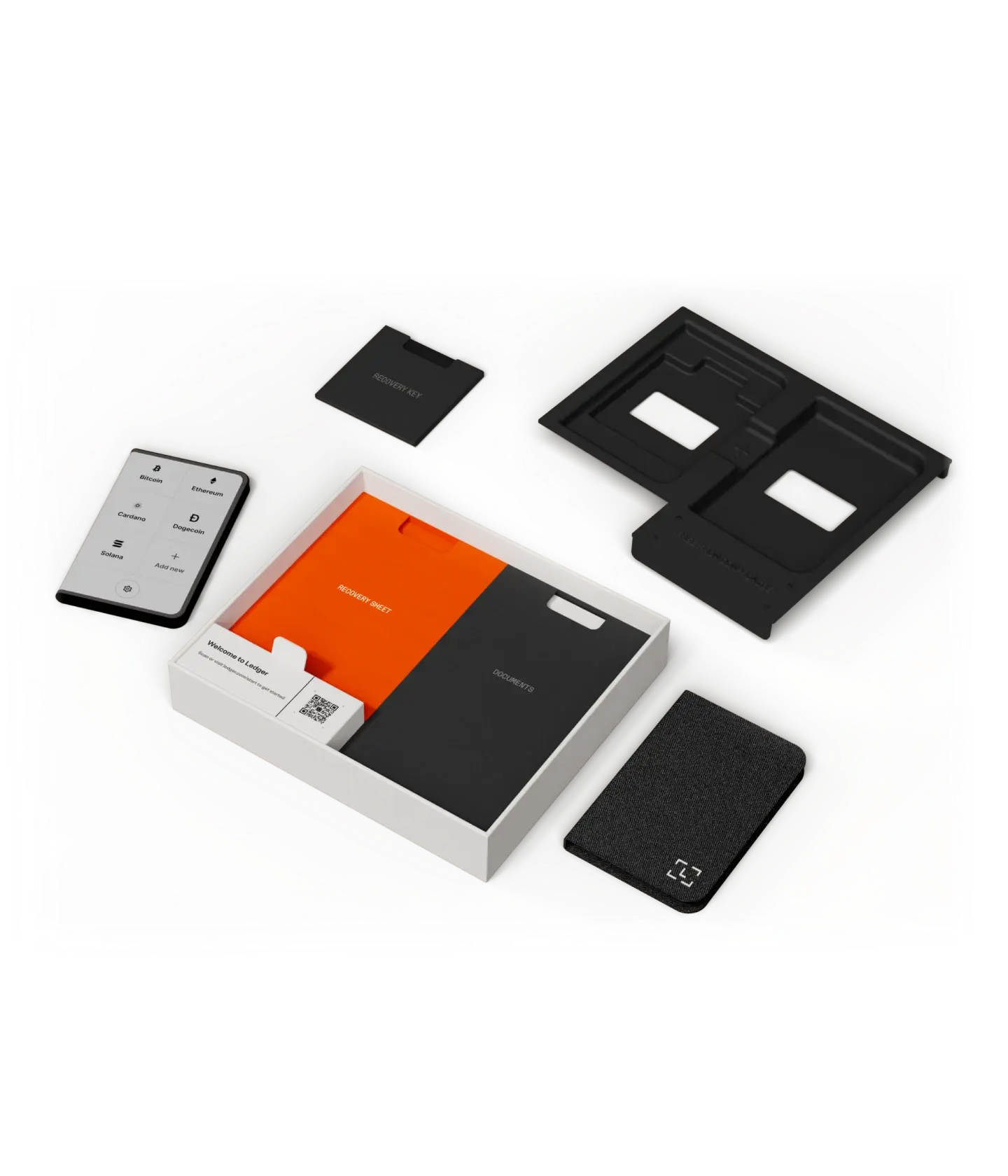


This article examines the Ledger Stax Wallet security configuration basics. It is important to shield your diverse crypto assets from hacks and scams.
Each digital wallet comes with the responsibility of ensuring appropriate setup and self-custody. These security steps will assist you, whether you are new to self-custody or an advanced crypto user.
What is the Ledger Stax Wallet?
The Ledger Stax Wallet is a premium hardware cryptocurrency wallet created by Ledger that is designed for safely storing digital assets like Bitcoin, Ethereum, NFTs, and countless other cryptocurrencies, safely and securely, offline.
The Stax Wallet is equipped with a curved E-Ink touchscreen, Bluetooth connectivity, and an advanced secure-element chip that protects private keys from hackers and malware. Stax Wallet’s isolation of sensitive data from internet-connected devices provides users with true self-custody.
Both advanced and beginner crypto investors looking to safely and securely store their digital assets, offline, are set to benefit from the Stax wallet’s highly customizable features like its lock screen, the transaction verification, and its user-friendly interface.
Why Security Setup is Critical for Crypto Users
Total Ownership Responsibility
With cryptocurrency comes total control over assets, but that also means no bank or authority can recover your funds after any security mistakes.
Protection from Hacking Attacks
With an appropriate wallet set up, various forms of malware, phishing, and other unauthorized access attempts will be prevented when directed toward a crypto holder.
Protection from Phishing Attacks
Recovery phrase theft can be attempted by fraudulent, support impersonating, and phishing websites. Proper wallet setup can significantly reduce these risks.
Private Key Protection
Proper securing of a device means the private keys will never leave that secured device.
Protection Against Supply Chain Attacks
Proper wallet setup will determine whether a wallet is secure and unmodified.
Protection Against Physical Theft
Protection exists against financial loss when a system is protected with a PIN code, passphrase, and other authentication methods.
Safe Transaction Verification
The proper security setup can allow for confirmation of the transaction address on the system and can also prevent a malware from changing the payment address.
Protection of Assets Over Time
The system can defend the loss of the wallet or damage of the wallet by guardian the proper management of recovery phrases.
Limiting Human Error
A lot of the losses of cryptocurrency are due to human error, but a defined security structure will reduce the risks that are associated with the user.
True Self-Custody Confidence
Security best practices ensure users can retain absolute self control over their investments.
Top Security Setup Steps for Premium Ledger Stax Wallet & Key point
- Buy only from the official Ledger store or authorized seller
- Check tamper-proof packaging before opening the wallet
- Initialize the device yourself during first setup
- Create a strong and unique PIN code
- Write down the recovery phrase offline on paper
- Store the recovery phrase in a secure physical location
- Never share your recovery phrase with anyone
- Enable the passphrase option for extra security
- Update Ledger firmware regularly for protection
- Always verify wallet addresses on the device screen before confirming transactions
Top 10 Security Setup Steps for Premium Ledger Stax Wallet
1. Buy Only from Official Ledger Store
For the Top Security Setup Steps for Premium Ledger Stax Wallet, you buy your device only from the Ledger website or authorized retailers.

Buying the device from anywhere else puts you at risk for tampering and configuring wallets to steal your funds. Factory sealed hardware and authentic firmware along with warranted issues from the official seller’s cybercriminal wallets are sold with malicious software recovery phrases.
If you only order from verified sources, you ensure your wallet begins and supplies are protected from one of the foremost overlooked issues of critical cryptocurrency security.
Buy Only from Official Ledger Store — Features
| Feature | Details |
|---|---|
| Authentic Hardware | Ensures genuine device manufactured by Ledger |
| Factory Security | Device comes untampered with original firmware |
| Warranty Protection | Access to official warranty and customer support |
| Supply-Chain Safety | Prevents risks from modified or fake devices |
| Secure Delivery | Verified packaging and trusted shipping channels |
| Official Updates Access | Safe firmware and Ledger Live compatibility |
| Reduced Scam Risk | Avoids compromised reseller devices |
| Verified Accessories | Includes genuine cables and recovery cards |
| Trusted Purchase Source | Eliminates unauthorized marketplace risks |
| Long-Term Reliability | Ensures device integrity from day one |
2. Check Tamper‑Proof Packaging
Examining the integrity of the package is important for the Top Security Setup Steps for Premium Ledger Stax Wallet.

A genuine Ledger Stax is shipped in a package that is sealed, and has no scratches, broken seals, or opened boxes. Check for the absence of the accessory, damaged seals, or misprints in the instruction sheet.
Ledger devices are shipped with no preprinted recovery phrases, and any phrase of this nature is also a great problem. Confirming the integrity of the package will eliminate the manipulation of the device that will happen before you set it up. This inspection is intended to secure the owner.
Check Tamper-Proof Packaging — Features
| Feature | Details |
|---|---|
| Seal Verification | Confirms device has not been opened before use |
| Anti-Tamper Design | Packaging designed to show interference |
| Missing Item Detection | Ensures all official accessories are included |
| No Prewritten Seed | Genuine wallets never include recovery phrases |
| Physical Security Check | First defense against hardware attacks |
| Device Authenticity | Confirms legitimate manufacturing origin |
| Early Risk Detection | Identifies compromised wallets quickly |
| User Confidence | Provides assurance before activation |
| Supply Chain Validation | Protects against manipulation during shipping |
| Safe Setup Start | Guarantees clean initialization environment |
3. Initialize Device Yourself
You personally must perform the initialization step when following Top Security Setup Steps for Premium Ledger Stax Wallet for the first power on of the device. Never use a device with already setup accounts, PINs, or recovery phrases.

The initialization steps will create the private keys in the secure element chip and vault of the hardware wallet. The steps create new credentials that no one else will have access to. You will exercise Self Custody of your keys, the essence of true self custody in cryptocurrency security practice.
Preconfigured wallets that are sold in stores or on the web with expedited setup should be avoided. They will provide you belongings that are configured by someone else, for someone else.
Initialize Device Yourself — Features
| Feature | Details |
|---|---|
| Secure Key Generation | Private keys created inside secure element chip |
| Full Ownership | Only the user controls wallet credentials |
| Fresh Wallet Setup | Prevents preconfigured or reused wallets |
| Malware Protection | Eliminates third-party setup risks |
| Secure Onboarding | Guided setup via Ledger Live |
| Independent Control | No external access to wallet creation |
| True Self-Custody | User maintains exclusive authority |
| Anti-Fraud Protection | Prevents seller manipulation |
| Cryptographic Security | Keys never leave hardware environment |
| Trusted Initialization | Establishes secure crypto foundation |
4. Create Strong PIN Code
Within Top Security Setup Steps for Premium Ledger Stax Wallet, the creation of a strong PIN is required, as it forms the first barrier of protection from your wallet being accessed in an unauthorized manner. Digits that are unrelated to your birth dates, or phone numbers, and patterns such as 1234, should all be avoided.

A wallet with the PIN setup to secure is locked with each attempt of an unauthorized access. Stolen and locked wallets have no access to the assets or to the keys. Your keys and all of the assets remain secure for the entire duration of the theft. Security and hardware encryption combined with a strong PIN significantly lessen the risks of the theft.
The elements each create a closure around access to the private keys that would remain in an unlocked device. A strong PIN is essential along with hardware encryption. A weak PIN signals the opposite.
Create Strong PIN Code — Features
| Feature | Details |
|---|---|
| Physical Access Protection | Blocks unauthorized device use |
| Multiple Attempt Lock | Device locks after incorrect PIN entries |
| Encryption Support | Works with hardware encryption layer |
| Custom PIN Choice | User selects secure numeric combination |
| Theft Prevention | Protects funds if wallet is stolen |
| Secure Unlock Process | Required for every wallet access |
| Offline Security | Protection without internet dependency |
| Easy Recovery | Reset possible using recovery phrase |
| Brute-Force Defense | Limits guessing attempts |
| Daily Protection Layer | First line of wallet security |
5. Write Down Recovery Phrase Offline
One of the most important steps in the Top Security Setup Steps for Premium Ledger Stax Wallet is conducting the offline writing of the recovery phrase after the phrase is generated from the setup steps.
The wallet creates a 24-word recovery phrase, which serves as the master backup – the phrase is used to restore the wallet and assets if the wallet is lost, stolen or damaged. Always write the phrase on paper or on a backup card that is made of metal.

Do not take a screenshot of the phrase to save it. Do not save the phrase in via email, in the cloud or in digital notes. It is possible for malware to crawl online storage or hacker to access the facilities and gain access to the recovery phrase.
If the recovery phrase is not on the internet, only you can access the recovery phrase, and you can have a hundred percent freedom for a long time to keep your crypto assets safe.
Write Down Recovery Phrase Offline — Features
| Feature | Details |
|---|---|
| Master Backup | Restores wallet on any compatible device |
| Offline Storage | Prevents exposure to online hackers |
| 24-Word Seed Phrase | Industry-standard recovery method |
| Device Independence | Funds recoverable without original wallet |
| Malware Resistance | Not exposed to spyware or keyloggers |
| Permanent Ownership | User controls crypto recovery |
| No Cloud Risk | Avoids digital storage vulnerabilities |
| Emergency Recovery | Enables account restoration anytime |
| Self-Custody Security | Essential for decentralized ownership |
| Long-Term Safety | Protects assets across years |
6. Store Recovery Phrase Securely
After having saved the phrase, the next step in ensuring your safety is one of the Top Security Setup Steps for the Premium Ledger Stax Wallet and involves the proper storage of the saved recovery phrase. Keep the recovery phrase in a safe, a locker, or a fireproof storage container.

You should use several secure storage locations in case of theft, fire, or even a flood. Do not keep the recovery phrase near the wallet. If you when you loose the wallet, you will have lost your recovery options as well.
Advanced users often use metal seed backups for the durability. Proper storage ensures that even in an emergency, you have full access to your digital assets and no one will gain access to the recovery phrase information.
Store Recovery Phrase Securely — Features
| Feature | Details |
|---|---|
| Physical Protection | Stored in safe, locker, or vault |
| Disaster Resistance | Protection from fire or water damage |
| Theft Prevention | Keeps phrase away from unauthorized access |
| Separate Storage | Not stored with the wallet device |
| Multi-Location Backup | Optional duplicate secure storage |
| Metal Backup Option | Durable long-term storage solution |
| Privacy Assurance | Only owner knows location |
| Family Recovery Planning | Enables inheritance preparation |
| Offline Safety | Eliminates digital attack exposure |
| Long-Term Asset Protection | Secures wealth preservation |
7. Never Share Recovery Phrase
Step 1 in the Top Security Setup Steps for Premium Ledger Stax Wallet is protecting your recovery phrase. This phrase is your master key for all the crypto on the device. No company, agent, or service will ever need your recovery phrase. Scammers will impersonate companies or wallet support teams through emails, fake sites, or direct messages to scams you into giving your recovery phrase.

The moment you provide your recovery phrase, scammers have access to all of your crypto. Your recovery phrase is actually more sensitive than all your banking info combined. Keeping the recovery phrase private grants you the ownership of your digital assets and defends against phishing and social engineering attacks.
Never Share Recovery Phrase — Features
| Feature | Details |
|---|---|
| Absolute Ownership Control | Phrase equals full wallet access |
| Phishing Protection | Prevents social engineering attacks |
| Scam Prevention | No legitimate support asks for phrase |
| Private Access Only | Exclusive user authorization |
| Fund Protection | Stops remote theft instantly |
| Identity Security | Prevents impersonation risks |
| Zero-Trust Principle | Protect sensitive credentials always |
| Anti-Fraud Practice | Blocks fake support scams |
| Self-Custody Responsibility | User maintains full control |
| Maximum Security Rule | Core hardware wallet principle |
8. Enable Passphrase Option
The additional Passphrase creates, so to speak, a hidden wallet on top of the regular recovery phrase, bolstering the security setup for your Ledger Stax Wallet.

Like a “25th word”, it creates separate accounts that cannot be accessed without the additional Passphrase. Even if the main recovery phrase is compromised, the funds are still protected. It also provides a means to create decoy wallets.
Passphrases should be difficult to guess, but should be memorable, and should not be stored with the recovery phrase. If you are managing a significant amount of cryptocurrency, this additional Passphrase is a great option to create an extra layer of security to ensure your holdings.
Enable Passphrase Option — Features
| Feature | Details |
|---|---|
| Hidden Wallet Feature | Creates separate secret accounts |
| Advanced Security Layer | Adds protection beyond recovery phrase |
| Decoy Wallet Option | Useful against coercion scenarios |
| Custom Passphrase | User-defined additional password |
| Privacy Enhancement | Conceals main holdings |
| Multi-Account Capability | Supports multiple wallet identities |
| Theft Resistance | Protects assets even if seed exposed |
| Expert-Level Protection | Recommended for high-value holders |
| Flexible Security Setup | User controls complexity level |
| Enhanced Self-Custody | Strengthens ownership security |
9. Update Ledger Firmware Regularly
To keep your Ledger Stax wallet secure, you must keep the firmware updated. Ledger frequently releases updates that improve the wallet as well as fix security issues and allow the wallet to support new blockchain integrations.

Only use the Ledger Live application to update the Ledger firmware, as it is the only official way to update. Always make sure to update the Ledger firmware, as hackers use outdated firmware to attack and exploit wallets.
Ledger displays the challenges that the wallet is facing, and updating it will ensure that it is secure and that the wallet operator is safe and able to manage cryptocurrency without interruptions.
Update Ledger Firmware Regularly — Features
| Feature | Details |
|---|---|
| Security Patch Updates | Fixes newly discovered vulnerabilities |
| Performance Improvements | Enhances device speed and stability |
| New Asset Support | Adds compatibility with new cryptocurrencies |
| Firmware Verification | Authentic updates confirmed on device |
| Bug Fixes | Improves overall user experience |
| Protection Against Exploits | Prevents outdated security risks |
| Ledger Live Integration | Safe update process |
| Long-Term Device Health | Maintains optimal functionality |
| Network Compatibility | Supports evolving blockchain standards |
| Continuous Security | Keeps wallet protection current |
10. Verify Addresses on Device Screen
The last measure in the Top Security Setup Steps for Premium Ledger Stax Wallet is confirming transaction addresses on the hardware wallet. Prior to confirming any transfer, you must check the transaction addresses posted on the Ledger Stax.

Malware on computers and/or phones is capable of replacing the wallet address that you copy on the clipboard, which in turn directs all your funds to the attackers.
The Ledger Stax shows the transaction to the wallet that is safely in the Ledger Stax, and is indifferent to the security of the other components of the ledger. Always use an address verification system to prevent your cryptocurrency from theft.
Verify Addresses on Device Screen — Features
| Feature | Details |
|---|---|
| Transaction Confirmation | Verify destination before approval |
| Malware Protection | Prevents clipboard address replacement attacks |
| Secure Display | Address shown inside hardware environment |
| User Authorization | Requires manual confirmation |
| Anti-Phishing Defense | Stops fake transaction manipulation |
| Independent Verification | Works even on infected computers |
| Accurate Transfers | Prevents sending funds to wrong wallet |
| Secure Signing | Transaction signed only after verification |
| Real-Time Validation | Shows full transaction details |
| Final Security Check | Last protection before sending crypto |
Conclusion
Implementing all the steps for securing your Premium Ledger Stax wallet is crucial due to the various dangers that come with the cryptocurrency market. During the multi-layered security process, the steps for purchasing only through the official Ledger store, conducting safe recovery phrase management, and verifying every transaction are crucial.
Ledger hardware wallets serve the purpose of safety, however, the ultimate safety lies within the complete process and the user’s responsibility. Security measures put in place help you to have complete ownership, privacy, and control of your assets.
FAQ
What is the most important security step when setting up Ledger Stax?
The most critical step is securely saving your recovery phrase offline. It acts as the master backup to restore your wallet if the device is lost, damaged, or reset. Without it, funds cannot be recovered.
Should I buy Ledger Stax from third-party marketplaces?
No. Always purchase from the official Ledger website or authorized sellers to avoid tampered or preconfigured devices that could compromise your crypto assets.
. Why must I initialize the device myself?
Self-initialization ensures private keys are generated securely inside the wallet. Pre-configured wallets may already be compromised, allowing attackers access to your funds.
Is a PIN code enough to protect my wallet?
A PIN code protects against physical access, but true security comes from combining PIN protection, recovery phrase safety, passphrase options, and firmware updates.
Can I store my recovery phrase digitally?
No. Never store recovery phrases in screenshots, cloud storage, emails, or password managers. Offline storage on paper or metal backup is the safest method.